
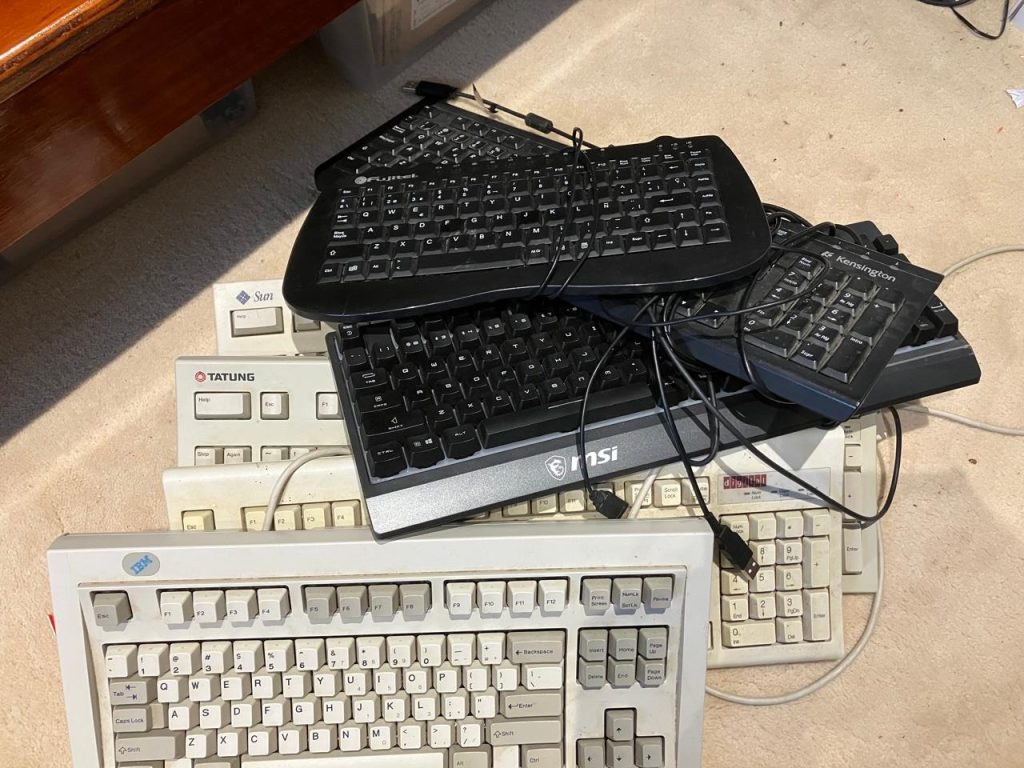
Over the years of owning computers, I have collected a lot of keyboards. Still have a lot and have gotten rid of a lot. In the picture above we can see keyboards from different companies (IBM, Digital, MSI, Sun Microsystems, Tatung, Kensington, and Fujitel). Some of those companies don’t exist anymore (Sun Microsystems and Digital). While I still have the Sun Microsystems and Tatung keyboards, I don’t have the computers anymore.
The latest keyboard that I have acquired is the Keychron V10 Max split keyboard with an Alice layout. It is a mechanical keyboard with three connection methods: 2.4 GHz wireless, Bluetooth 5.1 connection, and a wired connection. It has a 75% layout and offers a gasket mount design, sound-absorbing foam, double-shot PBT keycaps, and more. It has QMK/VIA support. You can program and remap the keys if you want to. A tool to remove the keycaps and key switches is provided.
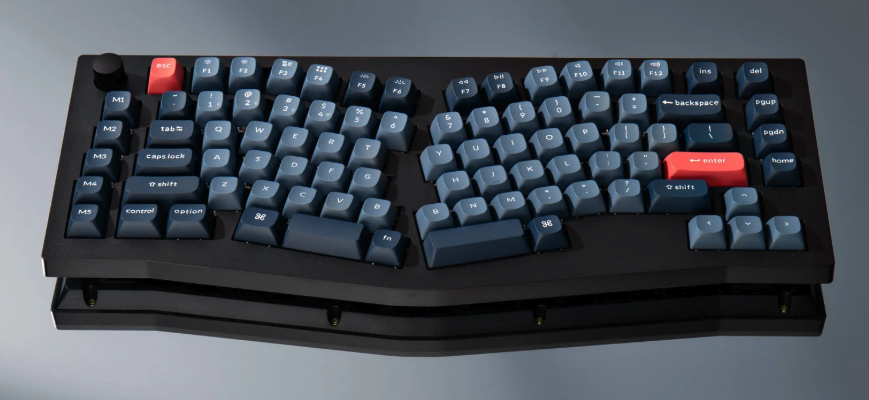
There is also a row with 5 keys on the left side of the keyboard, that you can program to a combination of key presses. You can reprogram any key on the keyboard to anything using QMK.
In order to program the keys, I opened up my web browser and went to launcher.keychron.com. The Keychron V10 Max needs to be plugged directly into your computer if you are using the wired connection. I plugged it into my KVM switch and I could not connect to the keyboard.
For each key I remapped, I used the “Custom” tab and then the “Any” button. I entered the QMK code directly as text. I programmed the M1, M2, and M3 keys. I reserve M4 and M5 for late. For M1, I programmed it to run the Mac Screenshot region which uses the key combo of Cmd+Shift+4. The QMK code for M1 was LGUI(LSFT(KC_4)). For the M2 key I programmed it to be Next Workspace on my Mac. In order to do that normally, you press Ctrl+Right-Arrow. The QMK code is RCTL(KC_RGHT). For the M3 key I programmed it to be Previous Workspace on my Mac. In order to do that normally, you press Ctrl+Left-Arrow. The QMK code isRCTL(KC_LEFT).
There were two key that I switch their functions between one another. The Esc key became the Caps Lock key and the Caps Lock key became the Esc key but with a twist. If you tap the key it will be an Esc key, but it you hold and press the key it will be a Ctrl key. The QMK code for that is MT(MOD_LCTL, KC_ESC). The QMK code for the old Esc key became KC_CAPS which was now the Caps Lock key.
While looking around for advice on which keys I should possibly remap, the Esc and Caps Lock keys were mentioned. I don’t normally use the Caps Lock key much, but I do use the Esc key frequently when I am using the Vi editor. To get out of insert mode you have to press the Esc key. It is easier to reach the Esc key if it is next to the A key. I don’t have to move my hand off the home row for my left hand in order to reach for the Esc key since right next to the A key.
I ordered some keycaps for the Esc and Caps Lock key from Yuzu. The original Caps Lock key on the Keychron V10 Max is 1.75u size and the original Esc key is 1u is size. So now I needed a 1.75u key for the new Esc/Ctrl key combo. And the new Caps Lock key is 1 u.
Until next time.