
When I put together my original Hackintosh, I planned on overclocking the i5-3570K but never did. The K CPU units are unlocked so they can be overclocked. Now that my new Hackintosh is fully functional, I have reassigned the original Hackintosh to other duties. I put a hard drive containing Win 10 Pro into the system. I had previously installed a copy of Win 10 Pro on this drive while it was attached to this system. I am going to run Win 10 Pro for a while. I still haven’t decided on whether or not I will make the system into a ProxMox box. But in the mean time I am going to overclock the i5-3570K in the system. One of the first things I did was to replace the stock Intel CPU cooler with something more substantial. The Artic cooler is on the left and the stock cooler is on the right.
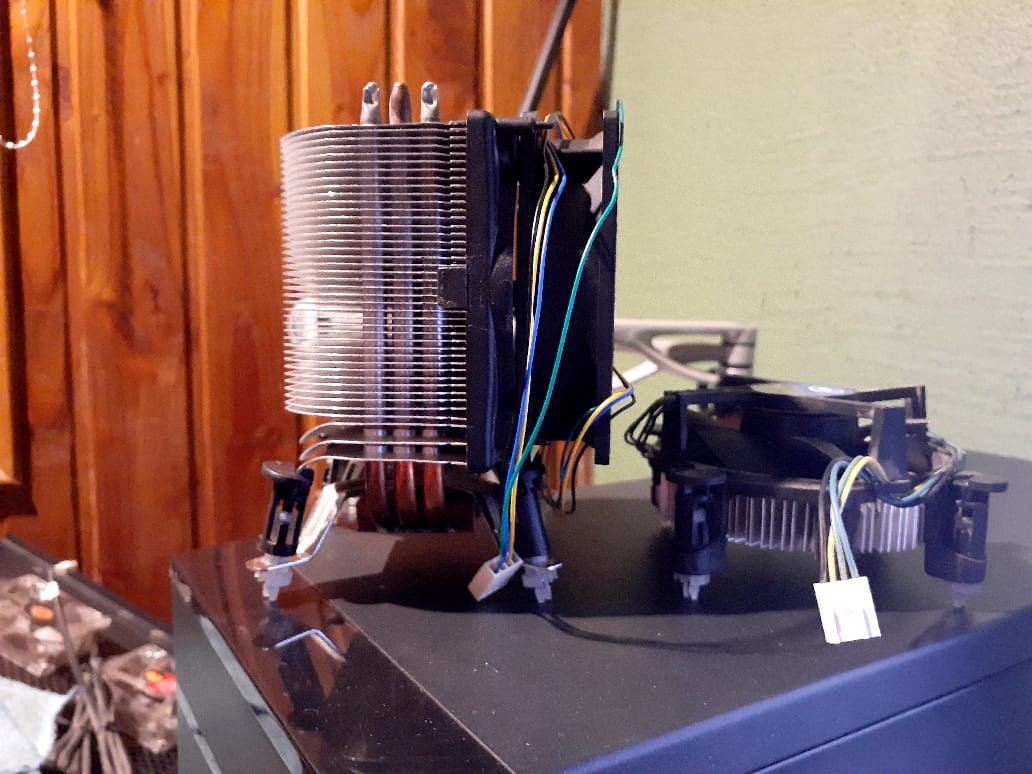
The fan on the Artic cooler howled and needed to be replaced. I was able to mount a 92mm fan onto the cooler’s shroud. This is the second time I had to replace the fan. I have had the Artic unit for more than 10 years. I also managed to break two of the mounting pins and had to get two mounting pins from the original cooler. I really don’t like how the mounting assembly was designed. If I have to remove the fan in the future, I will look into getting an adapter bracket to make the cooler mounting easier.
For my research on overclocking, I looked at a few videos where they overclocked an i5-3570K. Linus Tech Tips had a good one and so did Jay Z Two Cents. Plus there were a few more that I Iooked at. In preparation for the overclocking event, I gathered a few of their recommended programs (plus a few others that I found): Cinebench, Prime95, OCCT, CPU-Z, CPUID HWMonitor, GeekBench5 (free version), IntelBurn Test, and RealTemp. I will probably not use them all, but you never know. To get a baseline before I started overclocking I ran GeekBench5. The report that GeekBench5 generates is quite nice. For my baseline I will use the Single-Core Score which was 805 and the Multi-Core Score which was 2625. I also ran Cinebench to see what numbers that came up with. The CPU Multi-Core was 2783 and the CPU Single-Core was 752. The MP ratio was 3.70 x.
The two settings that I changed in my computer’s BIOS were the CPU Ratio (the multiplier) and the CPU Core Voltage. The initial values were 34 for the CPU Ratio and 1.350V for the CPU Core Voltage. First I increased the CPU Ratio by 2 to give me 34. Saved the changes and rebooted into Windows. Once in Windows I ran IntelBurn Test to check the stability of the overclocking. I eventually increased the CPU Ratio to 42. After getting to that point I then reduced the CPU Core Voltage by increments of 0.050V. After each time I did that I would run IntelBurn Test to check the stability. I did that until I reached a CPU Core Voltage of 1.200V. While I was running the IntelBurn Test, I also ran CPUID HWMonitor to look at the temperatures of the CPU cores and also the CPU usage. The last run of GeekBench5 netted me values of 895 for the Single-Core Score and 3015 for the Multi-Core Score. The last run of Cinebench gave me a CPU Multi-Core of 3172 and a CPU Single-Core of 835. The MP ratio was 3.80 x.
While the numbers look good, there are some other numbers that aren’t so great. The core temps are getting too high during the IntelBurn test. 🙁 The temperatures hit 105C for the highest overclocked settings that I used. For the default settings the temperatures were in the low 80C range, which is probably a bit too hot. The CPU might have a thermal transfer issue where the conductivity between the actual CPU and its lid is poor. While I am tempted to do it, I am not going to go through the effort of delidding the CPU and applying liquid metal. It is not worth it for this scenario. So I have increased the CPU ratio to 40 and set the voltage at 1.100V. Those setting only raises the core cpu temperatures a little more than what they are with the stock settings. The default settings has the CPU ratio at 34 and the voltage at 1.035v. The max temperatures for the default settings under the IntelBurn Test were 80c for core 0, 85c for core 1, 84c for core 2, and 82c for core 3. The max temperatures for my overclocked settings under the IntelBurn Test were 84c for core 0, 88c for core 1, 88c for core 2, and 84c for core 3. That’s it for this post. Catch you later.